Spooky2 Online Training Course — Spooky2 Technologies For Beginners

We were delighted to have Dorinel Patriche as our host in this training webinar.

Dorinel Patriche is a private user of Spooky2, who has been studying Nicola Tesla’s scalar energy, Royal Rife’s Mortal Oscillation Rate (MOR), and Recent advancements in Bio-resonance and Biofeedback. He also practices and teaches energy healing arts like Qigong and Reiki. He is an electronic engineer with a minor in medical electronics. Also, he loves Martial Arts. He has over 40 years of experience and a number of patents, both in Romania and North America.

In this webinar, Dorinel Patriche talked about the following parts:

  • The introduction of Rife Technology
  • Spooky2 Introduction
  • Spooky2 XM generator and GeneratorX
  • Different transmission modes: Contact, PEMF, Cold Laser, Remote, Plasma.
  • Effects of Spooky2 equipment: My experiences.
  • Q&A.

There are lots of question and answer from this training course. Hope it can help you:

Q: How to use GeneratorX?
A: GeneratorX contains 2 function generators, each with 2 outputs and full biofeedback function. GX can run at 40 MHz with any waveform, and can also load up to 30 programs from Spooky to run standalone without a computer. You can check more details on this blog: https://www.spooky2-mall.com/blog/spooky2-generatorx-users-guide/, and you can learn more via necessary videos: http://www.spooky2videos.com/categories/spooky2-generatorx/

Q: Does Spooky2 work on a MAC? 
A: Spooky2 was originally designed for use with Windows XP, but it also runs perfectly on Windows 7 and Windows 8 , 8.1 and 10. USB 2.0 or greater is required for frequency generator connectivity.
Regretfully, there are no native Mac or Linux versions. We recommend you pick up a pre-owned Windows PC and dedicate it to Spooky2.  
Or you can use BootCamp to create a Windows partition, or purchase virtualization software. You can download our helpful “ Spooky2 in Linux or Mac” PDF guide here under “Useful Documents.”
Download page: http://www.spooky2.com/downloadsPage/index.html 

Q: Does cold laser therapy treat the whole-body or specifically where it is placed on the body?
A: Spooky Cold Laser Twin can be inserted directly into your nostrils, ear, navel, or acupuncture points (meridians). Placing the lasers further from the target can treat larger areas.

Spooky Cold Laser Wrist is primarily designed to be strapped onto the underside of your wrist. This treats your carpel tunnel and the blood passing through the radial artery. The larger application area also makes this accessory ideal to treat the blood passing through the carotid artery on your neck or larger skin areas if long treatment times are desired. Spooky Cold Laser Wrist uses 5 x 5mW 650nm lasers.

You can check the instructions on this blog: https://www.spooky2-mall.com/blog/spooky-cold-laser-instructions/

Q: Do we need to close out the software and restart everything if we change the program or accessory?
A: You don’t need to restart the software if you want to change a program or transmission mode. However, after switching generator, please find ” utils ” on the top of spooky2 software and click ” rescan devices ” to rescan generator.

Q: What’s the best DNA sample to put in the remote?
A: Please check the below link for What Source of DNA for Remote Rife and How Long It Lasts: https://www.spooky2-mall.com/blog/what-source-of-dna-for-remote-rife-and-how-long-it-lasts/

Q: What are the difference between remote and sample digitizer?
A: This blog will help you understand the differences between remote and sample digitizer:

https://www.spooky2-mall.com/blog/what-are-the-differences-between-spooky2-sample-digitizer-and-spooky2-remote/

Q: What‘s the Difference Between GeneratorX (GX) and the XM Generator?
A: GeneratorX and the XM generator are very capable generators. They can both run the Spooky2 presets for Plasma, Contact, Remote, Coil and Cold Laser. They can also reach all the frequencies that are in the Spooky2 database. We have one blog that demonstrates the difference for customers: https://www.spooky2-mall.com/blog/what-is-the-difference-between-generatorx-gx-and-the-xm-generator/

Q: How to Do Foot Bath with Spooky2 Hand Cylinders?
A: You need Spooky2 Generator, Spooky2 Boost 3.1 and Spooky2 Stainless Hand Cylinders to do foot bath.
You can check the instructions on this blog: https://www.spooky2-mall.com/blog/how-to-do-foot-bath-using-spooky2-hand-cylinders/

Q: How to use PEMF coil?
A: The PEMF coil is a low power frequency source. It can be used for pain management, reduce inflammation, sleep disorders, depression and anxiety, bone healing and much more.
Please check those videos for how to use PEMF coil:
https://www.spooky2videos.com/video/what-is-the-pemf-coil-used-for/
https://www.spooky2videos.com/video/spooky2-generator-coil-hardware-connection-and-software-operation/
https://www.spooky2videos.com/video/spooky2-pemf-coil-qa/

Q: Finish biofeedback scan, should we use healing or killing programs?
A: GenX BFB results are for pathogens, parasites, bacteria etc…. so they should be run in kill mode. The XM will pick up the lower frequencies easier and those can be run in heal or kill. Each of these settings are not far from each other so you can use dual, kill or heal.

Q: Can the Scalar be used with Spooky2 generator?
A: Spooky2 Scalar has 3 different ways to apply Scalar Fields using Spooky2 Scalar: Pure Scalar, Molecular Scalar and Rife Scalar.
Rife Scalar to improve the Scalar waves is through the use of Rife Modulation. You can check details on the below link:
https://www.spooky2scalar.com/how-to-apply-scalar-fields-using-spooky2-scalar/.

Q: How many time a day I can use contact with the same program?
A: We suggest a maximum of two contact sessions per day. However, once a day is usually sufficient, followed up with Remote Mode for the rest of the day. You can certainly add a second contact treatment in the early evening to try to boost efficacy. But twice a day contact max. Protocol followers can freely and safely use the provided overnight Contact Mode presets.

Q: Is it best to run a baseline scan at first?
A: Baseline could disregard electrical noises, Wi-Fi signals and any other issues that may affect your scan and make your scan results even more accurate.
Here is why Baseline could achieve that. When you want to do a biofeedback scan with TENS Pads, stick the two pads together during Baseline. If it’s sample digitizer scan, put no samples during Baseline. As you can see, the only difference between the baseline and the actual scan afterwards would be the human body (or the sample).
we have one blog explain the details for you: https://www.spooky2-mall.com/blog/performing-extremely-accurate-biofeedback-scan-using-baseline/

Terrain Protocol
At Spooky2, we always recommend our users to run the Terrain Protocol Preset for detoxification before starting their Rife frequency treatment. Because Terrain Protocol was designed for full body detox, it will help your body ready for Rife frequency treatment.
For more information, you can check the below links:
https://www.spooky2-mall.com/blog/why-is-terrain-protocol-the-first-step/
https://www.spooky2-mall.com/blog/all-you-need-to-know-about-terrain-protocol/

Q1: Terrain protocol will run 11 days, did you put 11 days manually?
A: If you run the terrain protocol in Remote mode, it loops itself once 11 days until you manually stop it.
If terrain protocol is run in contact or plasma mode, it will run 2-3 hours a day, and you need to manually restart the subsequent presets the next day.

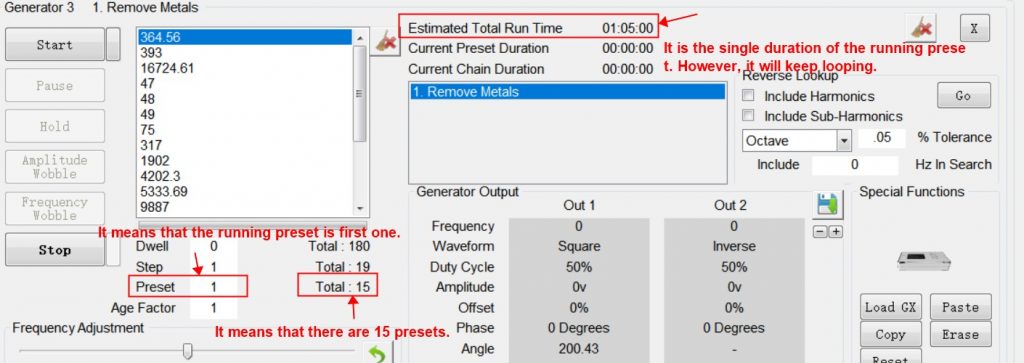
Q2: After choosing terrain preset, why does it only show 1 h on the control tab?
A: The terrain preset is a preset chain which includes 15 single presets. It will only show the single duration of the first preset on the control tab, however, it will loop 24 hours and go to next preset automitically.

Q: How to contact Spooky2?
A: Welcome to join our Facebook group: http://www.facebook.com/groups/spooky2/
You also can contact our support from the following ways:
Website chat: www.spooky2-mall.com
Email: support@spooky2-mall.com

If you want to Spooky2 Certificated Trainer, you can contact us at info@spooky2academy.com