
Q&A of Nigel Ryan Spooky2 FAQs Training Course
- Home >>
- Q&A of Nigel Ryan Spooky2 FAQs Training Course
Q&A of Nigel Ryan Spooky2 FAQs Training Course
Q1: How is it possible to know the exact frequency of just my organs which to harmonize?
A: When the body encounters stress, it alters its electrical fields through the autonomic nervous system. The results are changes in skin conductivity and heart rate.
Telling lies to someone creates stress, and the results of this are easily picked up by a polygraph. There’s nothing the subject can do to prevent this since the autonomic nervous system is not under conscious control. And it doesn’t matter how slight or how minute the amount of stress is – the body reacts just the same.
So if you input an ultrasound sweep into a subject’s body, and one or more of its frequencies produces a sympathetic resonance from, say, a pathogen or a parasite, the subject will always have a low-level stress reaction. Which is picked up immediately and recorded by Spooky Pulse’s heart rate monitor.
When the sweep is done, Spooky Pulse will then go through its list of “hits” and sweep carefully around them to find the exact frequencies that produce these tiny stress reactions.
The final result will be a list of frequencies that can be saved as a set and used to deal with the problem effectively because now you have the right frequencies. You’ve found the truth. Without taking out a second mortgage.
It helps reveal what pathogens, bacteria, bugs, worms, virus, etc are in the body and then shows what frequencies are needed to program spooky2 to defuse them, like mold, Lyme, etc. It will tell what specific mold spore is in your body, accelerate healing, release brain fog and body inflammation, etc.
Q2: Can Spooky Scalar BFB results be run on Central/plasma, and/or Remote?
A: Yes, you can run these results anywhere. One thing though, the Scalar only scans up to 50 kHz. For this reason, you might be better off doing a TENS pad scan.
However, there are cases where a TENS pad scan can’t be done, say like you are trying to scan for a brain parasite or you are trying to scan a pet with fur. In these cases where TENS won’t work, then Scalar is an excellent option.
On the other hand, John has said in the past that Scalar scan had amazing reverse lookup hits that matched known issues.
For more details, please check the link:
https://www.spooky2.com/forums/viewtopic.php?f=117&t=14533&sid=f16596b03a77fad43c2bc7629d5182d
Q3: After running terrain do people generally feel better when it has been complete?
A: It depends. Please check the link for more details: https://www.spooky2support.com/hc/en-us/articles/115002674008-Am-I-supposed-to-feel-anything-when-running-the-terrain-protocol
Q4: What about beneficial bacteria in your gut…doing a BFB could pick up their frequency as a hit and kill them as well…?
A: “The human body, it may surprise you to learn, is made up of more than 50% bacterial cells. Most of these organisms are harmless, some are beneficial, and some cause disease. Spooky2 is not capable of telling the difference between them — it can only report how much stress the destruction of each caused in your body. To put it another way, it lists the organisms that “screamed loudest.” But there’s no guarantee that these are the nasty ones…”——From Spooky2 Manual.
It will not affect good bacteria, if the frequency doesn’t resonate with the pathogen, it won’t work.
The human body contains far more good bacteria than bad bacteria. Therefore, you want to kill the bad bacteria and replenish the good bacteria. For this reason, some scans warn not to do it for too long. If you don’t know what’s wrong with your body, maybe do a BFB scan yourself first.
For more details, please click here:
https://www.facebook.com/groups/spooky2/permalink/2969953476499869/
Q5: Should I use the baseline? It is important?
A: The Baseline Before BFB button on the GenX Pro is used to establish a clean reference signal before performing a biofeedback scan. It helps eliminate environmental electrical noise, ensuring that only meaningful responses from your body or sample are detected during the scan.
When you run a Baseline scan, the system records background noise without any sample. This allows Spooky2 to ignore disturbances like Wi-Fi signals and electrical interference, improving scan accuracy. Once the Baseline is complete, you can proceed with your biofeedback scan as usual.
For more details, please click here:
https://www.spooky2-mall.com/blog/maximizing-biofeedback-accuracy-with-spooky2s-baseline/
Q6: How long can I use the same fingernails for treatment?
A: The fingernail can last for a long time.
Q7: Under the control tab, how to know which generator to select? sometimes i have 2 generators to choose from, sometimes i have up to 127 to choose from.
A: 1. Use Utils menu, Identify Generators command. Generator COM# shows as the last 2 digits of the Frequency. Use the check mark to exit the window.
Also, can set a checkbox in System tab to identify generators when stopped. When clicked, any stopped generator will show COM port #.
2. When I start up I am careful to watch which one lights up. You can number them at that time. Also, after they have started I can pause to have light stop and know which one it is. I gave up on trying to keep them in order. I live in a stormy area and have had to shut things down too often so I use the pause and start. Fast and works and easy. I have 15 generators so I picked easy!
3. I recommend you to click display port number, then the generator display will show which generator is connected to which port:
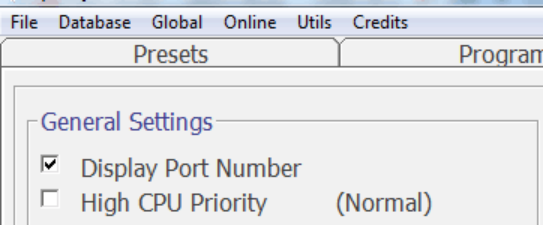
For more details, please check the link:
https://www.facebook.com/groups/spooky2/permalink/846606002167971/
Q8: How do I pause terrain protocol and later resume?
A: 1. If you click “Pause” in the Control tab for that generator, and leave everything as-is, and it is still in the same position when you get back, you can click “Pause” again, and it will continue exactly from where it was.
If you click “Stop”, or if there is a power loss, etc., making it necessary to restart: Be sure to note the Preset number. You will have to re-enter this when you restart the Terrain. This will restart this the chain at this location, although any time spent in this Preset will be repeated. There is a document in the Files section with details on restarting a Preset.
2. It is ALWAYS a good idea to screenshot the generator screen to maintain documentation of present location if you decide to try the Pause for several days.
For more details, please check the link:
https://www.facebook.com/groups/spooky2/permalink/772392262922679/
Q9: Is there any expert or community experience of when to replace the TENS-pads. The upper limit for the need for replacement of the pads? (number of skin applications and calendar time)?
A: 1. About 20 times. They can be reused. You can use it until TENS pads are not sticky. After each use, you can stick them onto the plastic sheet that they originally came with.
2. They will last as long as you can keep them sticky. Over time they will either pick up too much residue and/or dry out. Keeping them stored in the bags when not in use will prolong life. You can gently rinse the sticky side with water and let dry for a day, while stuck to the plastic storage square, to remove excess dead skin, etc. This will prolong their life once they start to lose their stick. It has also been reported that you can use an essential oil to keep the sticky side hydrated and clean prolonging life.
For more information, please check this link:
https://www.facebook.com/groups/spooky2/permalink/757258204436085
Q10: Where can you find what you saved,the scan??
A: Please refresh the database, then check at the bottom of the list of frequencies in the database (after Zygomycosis), it should be among your custom frequencies.
Every time you add into the database and waveforms, you will need to refresh them. I also turn off Spooky then restart after refreshing either one of them.
The scan results are saved in the file:
C:\Spooky2\custom.csv
This is your custom database, and also stores any custom frequency programs you create.
Just copy this file over and merge it with the copy on the other system.
The directory you were looking into are the raw data files that Spooky2 creates when you do a scan, from which it derives the top hits.
On a more important note, these are comma separated value files. They are not excel files (even though excel can work with them). If you open with excel, the format is changed and becomes corrupt for Spooky2.
Best to use notepad.exe to edit them.
For more details, please check the link:
http://www.spooky2.com/forums/viewtopic.php?f=8&t=5211
https://www.facebook.com/groups/spooky2/permalink/671011536394086/
Q11: Will the scan tell you the priority things your body needs to work on?
A: 1. The Scalar Digitizer biofeedback scan is a different type of scan. The Scalar Digitizer defines hits by measuring a drop in the electrical component of the scalar field because something in the body is requiring more scalar information to kill or heal. This could be a pathogen, healing or entrainment, or a higher energy blockage, etc.
2.The scan picks up the top 20 hits based on priority – what your body needs most. Just know the electrical component of the scalar field being measured is limited to 500Hz-50,000Hz and therefore the scan range is limited to 500Hz-50,000Hz, so it’s not the same as the much higher freq scans of GX (18 MHz).
3. But they are different. This is a Scalar scan for hits in the scalar field. It still produces a very unique and very accurate biofeedback scan, that penetrates every aspect of the body. When those scan results are reapplied back into the scalar field with GX, it smothers the body with the scalar information the body needed.
For more details, please check this link:
https://www.facebook.com/groups/spooky2scalar/permalink/810678552839038/
Q12: Is it OK to move while in the field or must you be still? Is it OK to use a mobile phone/wifi while in the field?
A: Scalar allows movement in the field. Some people expand the field to enclose most of the house, so they are in the field much of the day. But if you are doing BFB, you have to lie still.
Yes, working with electronics in the field is as okay as working with it anywhere…
