
Q&A of Mark Collins Spooky2 FAQs Training Course
- Home >>
- Q&A of Mark Collins Spooky2 FAQs Training Course
Q&A of Mark Collins Spooky2 FAQs Training Course
Q1: I have skin cancer on my face. I can’t place the pads above my shoulders??? What is the best placement for them in this case?
A: Spooky2 advises tens pads only placed shoulders down on body. Best to keep tens pads away from electrical activity of the brain.
More info: Spooky2 Blog – Tens Pads Placement:
https://www.spooky2-mall.com/blog/tens-pads-placement/
Q2: How can I add a certain frequency in my Gen X Pro?
A: Please check the link to know more details:
https://www.spooky2-mall.com/blog/how-to-load-programs-into-generatorx/
Q3: So if I want to run a cancer program for my face, I place the contact pads on my shoulders and see if I can tolerate 1 hr?
A: 1. You could do base of the neck at the shoulders. Higher up could interfere with brain function and nerve function as that is the communication center for the whole body. Also the area is more sensitive and more apt to get burns if the correct settings are not applied.
2. With areas above the neck, it is also stated not to use the TENS pads directly as the head is a very bad place to send electricity through. There is also the matter of resonating the area around the carotid arteries. While rare, it is possible to lock the muscles if you do something incorrectly and constrict the blood flow to your brain.
Not a great situation to be in. Therefore, when targeting areas of the head, use the areas of the shoulders for pad placement. As this gets the electricity closest to the area to be targeted safely.
3. To target my head I have used the back of the left shoulder and the front of the right shoulder. Works well for me.
For more details, please check the link:
https://www.facebook.com/groups/spooky2/permalink/739501659545073/
Q4: My final question if I get more generators what is the easiest way to find a which generator is which?
A: 1. Use Utils menu, Identify Generators command. Generator COM# shows as the last 2 digits of the Frequency. Use the check mark to exit the window.
Also, can set a checkbox in System tab to identify generators when stopped. When clicked, any stopped generator will show COM port #.
2. When I start up I am careful to watch which one lights up. You can number them at that time. Also, after they have started I can pause to have light stop and know which one it is. I gave up on trying to keep them in order. I live in a stormy area and have had to shut things down too often so I use the pause and start. Fast and works and easy. I have 15 generators so I picked easy!
3.I recommend you to click display port number, then the generator display will show which generator is connected to which port:
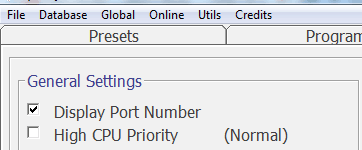
For more details, please check the link:
https://www.facebook.com/groups/spooky2/permalink/846606002167971/
Q5: When I want to run the contact mode, do I have to take off the remote? I can’t take it off I don’t know how
A: Yes. You can run two things at once on the GenX Pro because it has two generators. Just make sure you use the right shell preset for the transmission mode you are using (Remote vs Contact).
More information here: https://www.facebook.com/groups/spooky2/posts/2702037493291470/
Q6: Can the PEMF coil be used on top of clothing?
A: We suggest use the BN side of the coil to touch skin directly.
The coil can be used to help defuse chronic pain, regenerate tissue, cellular repair. Some have chosen to secure it depending on where it is needed. For example, if it is an ankle, I fit nicely right inside your sock.
Q7: What do you do when it says generator error?
A: Let’s see what our users said about the “generator error”:
I have been running a GX and 2 XM’s at my father-in-law’s house for Cancer for several months using contact mode with no problems. However, I needed a stronger treatment, so I brought my Spooky Central and plasma over to upgrade. I attached the Central to a generator on the GX. When running the plasma, the XM generators would take errors almost immediately. I followed all the placement and distance suggestions with no change in the problem. I also tried a USB isolator device, but that didn’t help either. I had the upgraded Tripp Lite cable going to the GX (the generator that was driving the central), but that made no difference. So I ordered new USB cables for the 2 XM generators. The Tripp Lite is not available, so I just ordered the Amazon Basics cable, which has no filters in it. I replaced both cables, and no more Generator Errors at all.
Bottom line: If you are getting generator errors and they are not power or sleep-related, replace ALL the USB cables.
For more information, please click here:
https://www.facebook.com/groups/spooky2/posts/3328250457336834
Q8: How many hours per day can you use plasma?
A: We recommend taking things slowly. The program running time depends on the dwell and number of frequency sets you choose. Everyone has different conditions. Listen to your body. If you feel tired and / or unwell, take a break and reduce your treatment times.
Plasma is best suited for short treatments, though you may choose to run the longer overnight Presets if you wish. Always ensure there is adequate ventilation around the tube.
To ensure safe operation and prevent potential hazards and burns, it’s important to have enough air flowing around your Plasma due to the temperature increase during operation. Avoid placing the plasma tube on top of fabric or a bed, and prevent direct skin contact.
Q9: If you run Terrain on Plasma tube, do you have to be around it? Or does it act like remote?
A: There is a near field and far filed about plasma treatment.
If it’s on your nightstand near your bed, your body will still benefit from it. It just won’t be as strong as when the tube is closed for near fields. And that’ll be much more like a contact station or something very slightly milder than that, but it will still be good, and the pathogens will still get attacked. But for any more serious complaint, use near field. 0-6 inches is the best efficacy.
For more details, please check the link:
https://www.facebook.com/groups/spooky2/posts/3091066991055183
Q10: Why is that only pair can be used at a time? I use currently one pair for a thoracic outlet syndrom but I have to use at 6 different areas for a single side (shoulders, chest, armpit) and it takes more than 2 hours so for both sides it lasts 4 hours or most. So I would like to reduce the time by using 2 pairs.
A: You cannot do 2 sets of TENS pads, as this creates a short circuit. So for contact, you have to live with the non-boosted contact. Alternatively, you can do a normal scan and create contact preset to run with the boost.
For more details, please check the link:
https://www.facebook.com/groups/spooky2/permalink/1671999039628659/
Q11: I don’t understand what the Boost is used for.
A: The primary purpose of the Boost is to allow one to combine both Out 1 and Out 2 of the generator for the following effects:
Double the amplitude, giving you the ability to square the power of contact mode.
Double the available voltage available to remote mode.
Mix two separate signals together (frequency addition), for output into one remote.
Provide current limited output for Colloidal Silver generation.
Properly align the polarity of the signal to match the field bias of both remote types.
Probably a few others, but this is the main list.
Suggest you connect it up to each generator and use the port that applies to your needs.
The Out 1 and Out 2 pass through ports on the top corners, provide the same output as if you did not have the boost installed. So no need to pull it off the generator for when this is the method you wish to use.
For more details, please check the link:
https://www.facebook.com/groups/spooky2/permalink/655587364603170/
Q12: If I save a Bfb to do later, do I have to have the tens pads on overnight or can I run the Bfb through the scalar field?
A: Yes, you can run these results anywhere.
However, there are cases where a TENS pad scan can’t be done, say like you are trying to scan for a brain parasite or you are trying to scan a pet with fur. In these cases where TENS won’t work, then Scalar is an excellent option.
On the other hand, John has said in the past that Scalar scan had amazing reverse lookup hits that matched known issues.
For more details, please check the link:
https://www.spooky2.com/forums/viewtopic.php?f=117&t=14533&sid=f16596b03a77fad43c2bc7629d5182da
For how long to run BFB scan results, it depends on your Spooky2 device, scanning every seven or four days is highly recommended.
Spooky2 Central/Plasma users should use the results program in a killing preset and run it once a day for four days, then scan again.
Contact Mode users should run it once daily for seven days, and then scan again.
Remote Mode should be run non-stop for a week and then scan again. Repeated scans are necessary.
For more details, please check the link:
https://www.facebook.com/groups/spooky2/permalink/1338080256353874/
Q13: Where would the best pad placements be for someone with Ankylosing Spondylitis… you will probably cover the low back area but what about for sacroiliac joint pain?
A:Tens placement is a user decision. The recommended location of the left ankle / right wrist is a general starting point to target the entire body. Makes sense as the electricity has to flow from one end to the other, thus providing coverage across as much of the body as possible.
It has already been stated in many locations including the user guide that if you have a known targeted area to address, the best placement is to bi-sect the area in question.
For example, if you are targeting your spleen, place the TENS pads on the front and back of the torso where the spleen is located. This focuses on the path of electricity to go through the area you intend to target.
With areas above the neck, it is also stated not to use the TENS pads directly as the head is a very bad place to send electricity through. There is also the matter of resonating the area around the carotid arteries. While rare, it is possible to lock the muscles if you do something incorrectly and constrict the blood flow to your brain.
Not a great situation to be in. Therefore, when targeting areas of the head, use the areas of the shoulders for pad placement. This gets the electricity closest to the area to be targeted safely.
Please check the Tens pads placement from the link:
https://www.spooky2-mall.com/blog/faqs-on-tens-pads-placement-and-more/
Q14: On the “Control Tab”, is the lower “VG” generator stand for “Virtual Generator” for testing?
A: VG stands for Virtual Generator. It is there for you to test your presets, or to be used as a master generator to control other generators as slave generators.
For more details, please check the link:
https://www.facebook.com/groups/spooky2/permalink/1491059371055961/
