
Q&A of Debbie Rich Spooky2 FAQs Training Course
- Home >>
- Q&A of Debbie Rich Spooky2 FAQs Training Course
Q&A of Debbie Rich Spooky2 FAQs Training Course
Q1: How to amend/delete a custom program?
A: This video shows how to edit a custom program in Spooky2 software:
https://youtu.be/nlVuIfCFc9M
For more details, please check the link from:
https://www.spooky2.com/forums/viewtopic.php?f=5&t=10473
Q2: I made a preset for myself. But it did not keep repeating in the remote like the other ones presets. I wonder what I did wrong that it only gave me one round and stop.
A: If you choose remote preset, you don’t need to change anything, it will run non-stop. If you still want to change, please change the repeat chain to 0 in the newest software, don’t change repeat sequence now.
For more details, please check the link:
https://www.facebook.com/groups/spooky2/permalink/1377051479123418/
Q3: What’s the difference between presets and programs? How to select and run presets and programs?
A: 1. Presets are organized setups. When you choose one, it automatically loads all the necessary settings in the software. When running factory presets such as Morgellons, you do not need to choose any programs as they are already selected in the presets. “Shell Presets” on the other hand, enable you to load any number of various setups one after the other and choose the frequency programs that suit you.
Programs are collections of individual frequencies that are related to a specific condition. Frequency sets make up programs, and multiple programs become sequences.
For more information, please read this blog:
https://www.spooky2-mall.com/blog/understanding-presets-and-programs-improve-your-exploration-of-spooky2/
For how to select presets and programs, please read this blog:
https://www.spooky2-mall.com/blog/how-to-select-and-run-presets-and-programs/
Q4: When do we use Kill and when to use Heal?
A: Please view http://bit.ly/remotequestion
If a condition has the word “disease” attached to it, it’s caused by a pathogen. Special cases are autoimmune diseases and inflammatory diseases – these can usually require both killing and healing, and when the pathogen is taken care of, the inflammatory process may continue and need to be healed with sets specific to this.
Killing is used for killing germs, bacteria, spirochetes, virus, candida, etc. Healing is for healing long term, and recovering from disease, etc.
For more details, please check:
Healing and Killing FAQ
http://www.spooky2-mall.com/blog/healing-and-killing-faq/
What is the Difference between Healing and Killing?
http://www.spooky2-mall.com/blog/what-is-the-difference-between-healing-and-killing/
Q5: Can all the presets be loaded onto the gen x pro?
A: No. GX pro can run at 40 MHz with any waveform, and can also load up to 30 programs from Spooky to run standalone without a computer.
When you press “Load” to add programs to GeneratorX pro, the settings saved in GeneratorX pro are Frequency, Waveform, Amplitude, Offset, Duty Cycle, Gate and Dwell.
These three kinds of common programs and settings can’t be loaded into GeneratorX pro: Preset Chain (like Terrain Protocol), Frequency Sweep Presets and Repeat Frequency Settings.
Q6: How do you add or remove preset from the chain saved presets?
A: How to add:
1. Put your scan results in an empty shell.
2. Save it as a preset.
3. Go to the presets, add your preset to the chain, and the other presets you’d like to add. Add it in the order you’d like.
4. Take care, that the presets you add should have a limited duration. Either by not repeating forever or by adding a duration in the settings.
5. Then save the preset chain as a new preset.
For more details, please check the link:
https://www.facebook.com/groups/spooky2/permalink/1204320249729876/
How to delete:
Click on another preset.
Use the ChainEditor to delete child presets out of a chained preset.
For more details, please check the link:
https://www.facebook.com/groups/spooky2/posts/2056671874494705/
Q7: On the program>Control>Generators> VG what is this ??
A: The VG generator is a virtual generator.
It is useful for loading presets to see how they would run (testing), for doing biofeedback analysis if the other generators are busy, etc.
It behaves just like a real generator, only it doesn’t actually do any real work.
For more details, please check the link:
https://www.facebook.com/groups/spooky2/posts/2130604007101491/
Q8: How do you know what programs or presets to select?
A: 1. In choosing frequencies, these are the options I have found:
1- Do a BFB scan.
2- Run a protocol like Morgellons/Lyme to get everything.
3- Pick different programs and when I feel bad to make a note of where in the program I am at. You can load up to a couple hours’ worth of “like” programs at a time.
If doing #3, also look to see what kind of frequencies they are – PROV, XTRA.
- Another option that I use all the time, and many others here do too, is to dowse with a Pendulum or Muscle test and ask the body which Presets and Programs are best to use. Works marvelously.
- Yet another option is to learn how to do a grade scan. That is a kind of biofeedback scan whereby you ask the system to give you the best frequencies for your body that are in premade frequency sets. You can then get a whole host of frequencies, select the top 10 or 20 and then create a set with them and run that through a shell preset.
For more details, please check the link:
https://www.facebook.com/groups/spooky2/permalink/1288357144659519/
Q9: Is there a preset or a program persons could run to test it actually works?
A: 1. The First thing I ran was terrain and day 6 I felt pins in my feet & legs. Maybe you don’t have it hooked up correctly.
- Do you feel the reaction / electricity in contact modus?
I can hardly bear
I feel my back/lymphs during the terrain session.
So for me it does at least something.
Yesterday I runned a bacteria program for the mouth and I really feel relief.
But there is also a lot going on in my body so there is a lot to heal, then it is beneficial.
- Overt results for me was a simple insect bite that was really itchy. I put a few Insect bite frequencies onto a sticker and placed right on the bite bump area. Bite bump went down within a few hrs (itching stopped within a few mins). Stickers were in the remote for aprox 5 mins for imprinting. Try things that are very obvious eg a bruise, a mosquito bite,.. things that you can say are like “pain or No pain”
- Use the tens pads hooked to your arm or leg and run a preset that contains a variety of frequencies. You should be able to feel some pulses.
- Try a ‘killing’ frequency, they are strong and can feel them. Especially if on a boost!
Source: https://www.facebook.com/groups/spooky2/permalink/2821706594657892/
Q10: Are healthy cells not in danger of being affected by rogue frequencies?
A: No. Human body cells respond to a much higher frequency than those produced by a Rife machine and do not resonate to the frequencies produced by a Rife machine.
Q11: Should cancer programs be run in a killing preset?
A: Yes, cancer is something unwanted in the body. Use killing presets.
However, when a killing program is running on one Generator, the Detox to use on a separate generator is Detox Maintenance. It cycles through its programs every 5 hours and targets major organs.
Terrain cycles every 11 days. Though it can be repeated as needed, most people only do it the first 11 days of rife therapy then perhaps once a year. You can run a killing program e.g., cancer, and a Terrain at the same time. However, if your Herx reaction from the killing program is already too heavy to endure, do not run it with Terrain anymore.
For more details, please check the link:
https://www.facebook.com/groups/spooky2/posts/2168400226655202/
Q12: What’s the difference between Biofeedback and Frequency sweeps?
A: https://www.spooky2-mall.com/blog/spooky2-sweeps-explained-when-you-dont-know-the-exact-frequency/
Sweeps and Biofeedback are often confused or compared, but they serve fundamentally different roles.
Sweep:
Executes frequencies across a range
Does not measure or rank responses
Designed for coverage and execution
Biofeedback:
Measures the body’s immediate response to frequencies
Helps rank or filter frequency options
Functions as a selection and screening tool
Biofeedback reflects current responses, not long-term relevance or complete system behavior.
Sweeps, by contrast, do not depend on immediate feedback and are better suited for situations involving variability, groups, or environmental targets.
They are not competing methods. They address different stages of decision-making.
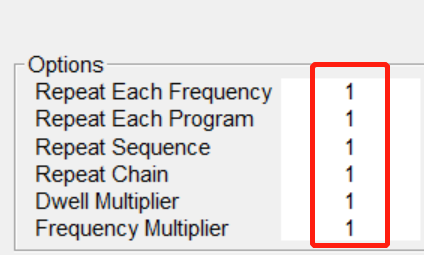
Q13: When creating preset chain, how do I make sure that the first preset has been set to NOT loop continuously?
A: When you make the preset after you loaded programs (in the program tab) in the lower left window,you must check in the right option window on the side of “write” repeat sequence-repeat chain, will there only the number “1” for all the option.
Source: https://www.facebook.com/groups/spooky2/posts/2729639040531315/
Q14: I would like to run multiple presets but when I add more than one it picks the last in the list only. Is there a way to run multiple presets?
A: You have to create a chain preset—Spooky2 won’t run multiple presets unless they are saved as a single chain.
Pick the preset you want and add it. Then click on ‘Programs’ and add each one you want to include in the chain. Once you have all you want, save them all as one preset. Just make sure that when you create a chain, you are using the same mode (all Plasma, all Remote, or all Contact)—don’t mix and match. Your saved chain will show up under the Preset tab, under the ‘person’ icon (next to the house icon).
To test that your chain is working:
Go to the Control tab. Enter 3000 in the Age Factor field (below the frequency box). Tick ‘Overwrite Generator’ and select VG (Virtual Generator). Click Start.
This will run your chain in super fast mode so you can see each preset load in sequence.
Once tested, click Stop, set Age Factor back to 1, select your real generator, and click Start again to run it normally.
Important: Do not run Age Factor 3000 on yourself—it’s just for testing the chain.”
If you’re unable to load presets into the chain, make sure your generator is connected. Some users found that chain creation may not work properly unless the generator is powered on and connected to the computer.
Source: https://www.facebook.com/groups/spooky2/posts/3104125909749291/
