
Q&A of Dr. Bill McGraw Spooky2 FAQs Training Courses
- Home >>
- Q&A of Dr. Bill McGraw Spooky2 FAQs Training Courses
Q&A of Dr. Bill McGraw Spooky2 FAQs Training Courses
Q1: Do I need to buy Spooky2 Central and Scalar for killing pathogens like babesia? Is plasma is stronger than scalar for killing pathogens?
A: 1. If you can afford both these items, then I would get them.
Plasma is recommended for long term health problems and chronic conditions.
In my view, Scalar is subtle and heals at cellular level and I am very grateful for mine because it healed an issue in my left breast, got me sleeping again after many, many years of insomnia and I can play my GeneratorX through Scalar as well as do biofeedback scans (also via Scalar Rife).
And if you want to cover all the bases, then get some hard working XM’s with remotes to do the work of running different healing and killing programs simultaneously and a Pulse for its ability to find frequencies via your BPM (heart rate).
- Depends on what you’re dealing with we have a longer track record with plasma with cancer but if you can work GX and Scalar very strong delivery system also.
For more details, please check the link:
https://www.facebook.com/groups/spooky2/permalink/1494460047382560/
Q2: I have colon rectal cancer. Can the rife machine help me?
A: Yes, use plasma if you have it. If not use GenXPro as I believe it’s best for killing.
You can use the GenXPro with central, but use the special BNC cables and USB cable which have the metal rings with coiled wires where they plug into the generator. this is to shield the generator and PC from Central high voltage I believe.
For more details, please check the link: https://www.facebook.com/groups/spooky2/permalink/1661030857392144/
Q3: Can someone with hip or knee replacements use scalar energy? Also, can scalar kill all pathogens? Remove scalar remove heavy metals?
A: Yes. People who have metal implants can use Spooky2 Scalar, which will not interfere with any metal implants since the scalar field passes straight through metal.
Scalar can help you repair your immune system and then you can resist the pathogen by yourself.
And scalar can remove the heavy metals, we suggest you run the terrain protocol first.
Q4: Does the PEMF coil need to have direct contact with the area in pain or just in general area?
A: Your choice. If the spot you are working on is focused, you don’t need to move it.
If the area you are working on is much larger, then moving it over time would be appropriate. However, you don’t need to move it as if you are massaging the area.
Depending on how many frequencies you are using (I just use 1 typically), you may wish to move it every 15m or after one loop of your frequency list has been applied.
For more details, please check the link:
https://www.facebook.com/groups/spooky2/posts/2044850782343481/
Q5: Does the PEMF coil used on Central and/or GenXPro work the same?
A: There’s only one Spooky2 PEMF coil. The PEMF coil used with spooky2 generator to run Spooky2 PEMF mode and the PEMF coil connected to central unit are the same PEMF coil. PEMF coil can be connected to the high-power port of a boost to run PEMF mode with a generator directly. But an adapter is needed to connect PEMF coil to central unit.
The PEMF coil for spooky central is for cellular electroporation. This makes the cells more susceptible to the plasma treatment. It’s a fixed 100 Hz signal. The PEMF for the generator, does a broad spectrum of treatments.
For more details, please check the link:
https://www.facebook.com/groups/spooky2/posts/2281154452046445/
Q6: Can you use MiraMate Mat while sleeping in the Scalar field?
A: Yes, you could use MiraMate mat in scalar field, but remember not to use plasma and scalar at the same time. Plasma and Scalar are both very strong, so you may not be able to accept such a high level of efficacy output.
Q7: How to use Hunt & Kill on Spooky2 Scalar? How do I set generators?
A: 1. The Scalar BFB scan results or Rife program(s) are sent to the generator USB port number that corresponds to the cable connected to the BNC connector on Spooky2 Scalar.
As an example on my laptop:
USB Port 7 is G1 on GX (my input channel) and I have cable connected to OUT1 which connects to Scalar Digitizer input on Scalar transmitter. I have no boost board fitted to G1.
USB Port 8 is G2 on GX (my output channel) and I have cable connected to OUT1 which connects to BNC connector on Scalar transmitter. I could connect a Boost board if I wanted to.
Re Hunt and Kill program.
The same applies as stated above. You need to set the port number in Settings tab that corresponds to your USB port assignment on your computer. In my example above I would make Output = 7 in Output Shadowing panel.
So port 7 is my input channel for BFB signal and port 8 is my output channel that sends BFB scan results to modulate the Scalar (tuned) frequency.
2.In the note of master preset, it says:
“7. Select the Master preset and load into G1.
8. In the After Scan frame of the Control tab, set ‘Run on Gen’ to the port number of G2.
9. Start the biofeedback using G1.”
You need to set G2 to run scan results manually.
For more details, please check the link from:
https://www.spooky2.com/forums/viewtopic.php?f=115&t=10625
Q8: Can you use Spooky2 if you had a full knee replacement?
A: Here is some customers’ experience, you can check it for more:
My sister had a double hip transplant and I use it on her with no issues. The only thing would be a warning for pacemakers not to use contact mode (even though pacemakers made after 1994 apparently will not be affected). I also have clients with knee replacements with no issues.
For more details, please check the link:
https://www.facebook.com/groups/spooky2/posts/2027501350745091/
Q9: If I want to use the PEMF coil from the connection provided on the Spooky2 Central front panel, which preset should I use?
A: 1. The PEMF connection on the Central uses a fixed 100 Hz frequency that is embedded in the Central. To turn the PEMF coil on, just power up the Central and flip the switch near the PEMF port to ON.
2. This ON switch also engages the contact port which uses the same fixed 100 Hz frequency to induce electroporation.
3. Both ports are independent of the generator which should only use a Plasma preset to drive the plasma tube and subharmonics of the ultrasound output.
4. The PEMF and contact port on the Central are there to augment plasma. Not usable as independent modalities driven by a generator.
For more details, please click this link:
https://www.facebook.com/groups/spooky2/posts/2037408433087716/
Q10: I have the black round PEMF coil that connects to the generator. If i want to use that, do I use that along with the plasma tubes as well? or I have to use them separately?
A: 1. It would be more inclined to use spooky central with both its plasma and PEMF to maximize plasma absorption at the site of the coil.
2.Using separate devices will give you stronger power. Even though you can run several things through the spooky2 central it is sharing the power of the device.
For more details, please check the link:
https://www.facebook.com/groups/spooky2/permalink/1443771905784708/
Q11: After running Terrain, what would be a good next step for prostate cancer?
A: 1. I took some time to create some program ideas you can run. If it’s convenient I would recommend a few Contact sessions a week (as much as your friend can handle) run in conjunction with Detox/Cleansing support.
This is for the Killing modality you may try these programs. I’ll come back to include another one for Healing.
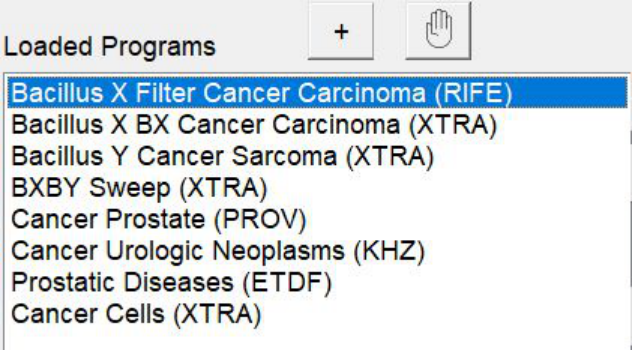
- These programs here should be used with Healing (use a Healing preset) it’s ok to run these continuously too on Remote transmission whilst you utilize the other generator to Kill (run in conjunction if you can)
If at any point your friend feels overwhelmed by any immunological response. It’s also ok to take breaks/rest as needed and it’s recommended to drink lots of water to assist the detoxing process.
Implementing a slightly alkaline inducing diet will also help improve the whole process (as Cancer thrives in acidic environments).
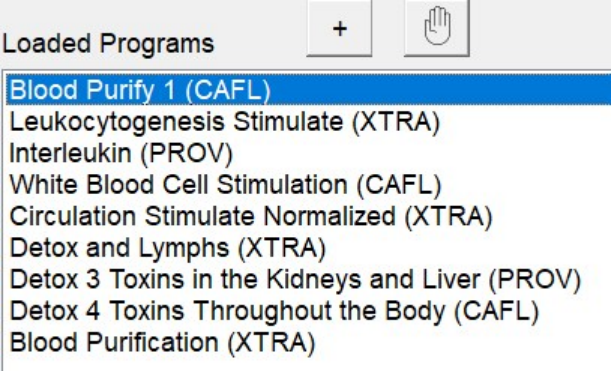
For more details, please check the link:
https://www.facebook.com/groups/spooky2/permalink/1430011977160701/
Q12: If I want to make sure the programs I select only run for a maximum of 4 hours, where do I make the adjustments/change settings?
A: First it would not work if you had say 6 hrs of frequencies to run only 2/3s of it for 4 hours.
So while we could use the Run For x Hours setting to limit the program to 4 hours, this is actually a better method.
When you build your program, it will give you a Estimated Total Runtime.
Limit the program to 4 hours or less.
You will note to the right that there is a setting:
Repeat Sequence = 0
This means that it will run the program non-stop until you stop it.
Change this to = 1 to limit the program to one complete loop.
This will terminate the program before the 4 hour mark.
However, there in lies a new problem.
Remote programs need repeats to build efficacy. One application loop will not do much.
However, if you are testing the waters, I can understand your approach. Just try to get past the one application loop as soon as you are comfortable.
However, if you have say 30 minutes of frequencies you want to run for say sleep.
This would be a good time to use the Run For x Hours setting.
In this case, leave the Repeat Sequence = 0 in place, and on the Settings tab, edit the Run For x Hours to set a 4 hour limit.
Keep in mind again this only works for programs who’s one loop runtime is shorter than say 2 hours.
For more details, please check the link:
https://www.facebook.com/groups/spooky2/permalink/734511963377376/
